CSS Horizontal & Vertical Align
Center Align Elements
To horizontally center a block element (like <div>), use margin: auto;
Setting the width of the element will prevent it from stretching out to the edges of its container.
The element will then take up the specified width, and the remaining space will be split equally between the two margins:
.center {
	margin:  auto;
	width:  50%;
	border:  3px solid green;
	padding:  10px;
}

Center aligning has no effect if the width property is not set (or set to 100%).
Center Align Text
To just center the text inside an element, use text-align: center;
.center {
	text-align:  center;
	border:  3px solid green;
}

Center an Image
To center an image, set left and right margin to auto and make it into a block element:
img {
	display:  block;
	margin-left:  auto;
	margin-right:  auto;
	width:  40%;
}

Left and Right Align
Using position
One method for aligning elements is to use position: absolute;:
.right {
	position:  absolute;
	right:  0px;
	width:  300px;
	border:  3px solid #73AD21;
	padding:  10px;
}

Absolute positioned elements are removed from the normal flow, and can overlap elements.
Using float
Another method for aligning elements is to use the float property:
.right {
	float:  right;
	width:  300px;
	border:  3px solid #73AD21;
	padding:  10px;
}
The clearfix Trick
If an element is taller than the element containing it, and it is floated, it will overflow outside of its container. You can use the "clearfix hack" to fix this (see example below).
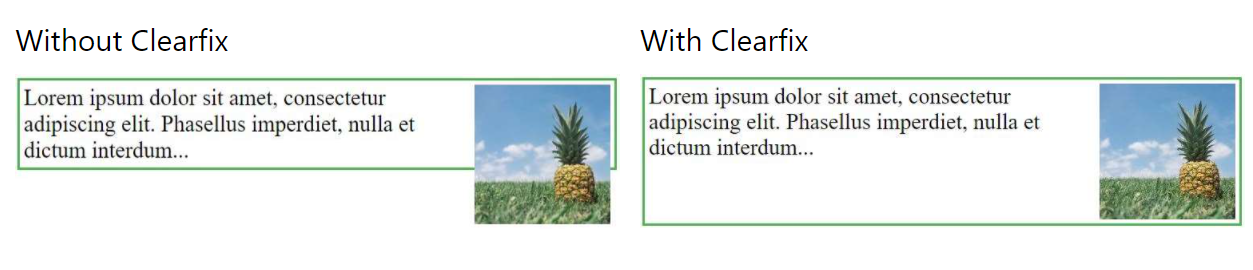
Then we can add the clearfix hack to the containing element to fix this problem:
.clearfix::after {
	content:  "";
	clear:  both;
	display:  table;
}
Center Vertically
Using padding
There are many ways to center an element vertically in CSS. A simple solution is to use top and bottom padding:
.center {
	padding:  70px 0;
	border:  3px solid green;
}

To center both vertically and horizontally, use padding and text-align: center:
.center {
	padding:  70px 0;
	border:  3px solid green;
	text-align:  center;
}

Using line-height
Another trick is to use the line-height property with a value that is equal to the height property:
.center {
	line-height:  200px;
	height:  200px;
	border:  3px solid green;
	text-align:  center;
}

/* If the text has multiple lines, add the following: */
.center p {
	line-height:  1.5;
	display:  inline-block;
	vertical-align:  middle;
}

Using position & transform
If padding and line-height are not options, another solution is to use positioning and the transform property:
.center {
	height:  200px;
	position:  relative;
	border:  3px solid green;
}

.center p {
	margin:  0;
	position:  absolute;
	top:  50%;
	left:  50%;
	transform:  translate(-50%, -50%);
}
Using Flexbox
You can also use flexbox to center things. Just note that flexbox is not supported in IE10 and earlier versions:
.center {
	display:  flex;
	justify-content:  center;
	align-items:  center;
	height:  200px;
	border:  3px solid green;
}