CSS Overflow
The CSS overflow property specifies how to handle the content when it overflows its block level container.
The overflow property specifies whether to clip the content or to add scrollbars when the content of an element is too big to fit in the specified area.
The overflow property has the following values:
visible: Default. The overflow is not clipped. The content renders outside the element's boxhidden: The overflow is clipped, and the rest of the content will be invisiblescroll: The overflow is clipped, and a scrollbar is added to see the rest of the contentauto: Similar toscroll, but it adds scrollbars only when necessary
The overflow property only works for block elements with a specified height
In OS X Lion (on Mac), scrollbars are hidden by default and only shown when being used (even though "overflow:scroll" is set).
overflow: visible;
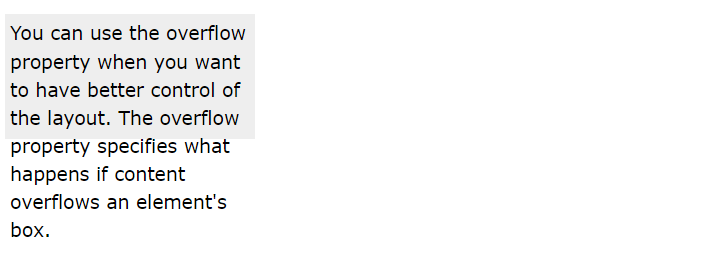
By default, the overflow is visible, meaning that it is not clipped and it renders outside the element's box.
Example:
div {
	width:  200px;
	height:  50px;
	background-color:  #eee;
	overflow:  visible;
}
overflow: hidden;
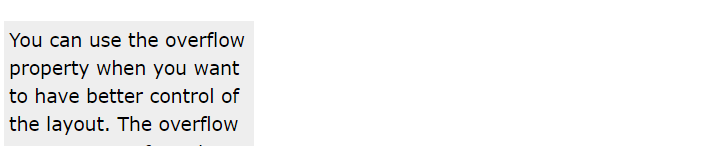
With the hidden value, the overflow is clipped, and the rest of the content is hidden.
Example:
div {
	width:  200px;
	height:  50px;
	background-color:  #eee;
	overflow:  hidden;
}
overflow: scroll;
Setting the value to scroll, the overflow is clipped and a scrollbar is added to scroll inside the box. Note that this will add a scrollbar both horizontally and vertically (even if you do not need it).
Example:
div {
	width:  200px;
	height:  50px;
	background-color:  #eee;
	overflow:  scroll;
}

overflow: auto;
The auto value is similar to scroll, but it adds scrollbars only when necessary.
Example:
div {
	width:  200px;
	height:  50px;
	background-color:  #eee;
	overflow:  auto;
}

overflow-x and overflow-y
The overflow-x and overflow-y properties specifies whether to change the overflow of content just horizontally or vertically (or both):
overflow-xspecifies what to do with the left/right edges of the content.overflow-yspecifies what to do with the top/bottom edges of the content.
Example:
div {
	overflow-x:  hidden;  /* Hide horizontal scrollbar */
	overflow-y:  scroll;  /* Add vertical scrollbar */
}
overflow-wrap
The overflow-wrap property specifies whether or not the browser can break lines with long words, if they overflow the container.
Example:
div {
	overflow-wrap:  break-word;
}