HTML Unordered Lists
The HTML <ul> tag defines an unordered (bulleted) list.
An unordered list starts with the <ul> tag. Each list item starts with the <li> tag.
The list items will be marked with bullets (small black circles) by default:
Example:
<ul>
  <li>Item</li>
  <li>Item</li>
  <li>Item</li>
</ul>
Output:

Choose List Item Marker
The CSS list-style-type property is used to define the style of the list item marker. It can have one of the following values:
| Value | Description |
|---|---|
| disc | Sets the list item marker to a bullet (default) |
| circle | Sets the list item marker to a circle |
| square | Sets the list item marker to a square |
| none | The list items will not be marked |
Disc
<ul style="list-style-type:disc;">
  <li>Item</li>
  <li>Item</li>
  <li>Item</li>
</ul>
Output:

Circle
<ul style="list-style-type:circle;">
  <li>Item</li>
  <li>Item</li>
  <li>Item</li>
</ul>
Output:

Square
<ul style="list-style-type:square;">
  <li>Item</li>
  <li>Item</li>
  <li>Item</li>
</ul>
Output:

None
<ul style="list-style-type:none;">
  <li>Item</li>
  <li>Item</li>
  <li>Item</li>
</ul>
Output:

Nested HTML Lists
Lists can be nested (list inside list):
<ul>
	<li>Item</li>
	<li>Item
		<ol>
			<li>Sub-Item</li>
			<li>Sub-Item</li>
		</ol>
	</li>
	<li>Item</li>
</ul>
Output:

note
A list item (<li>) can contain a new list, and other HTML elements, like images and links, etc.
Horizontal List with CSS
HTML lists can be styled in many different ways with CSS.
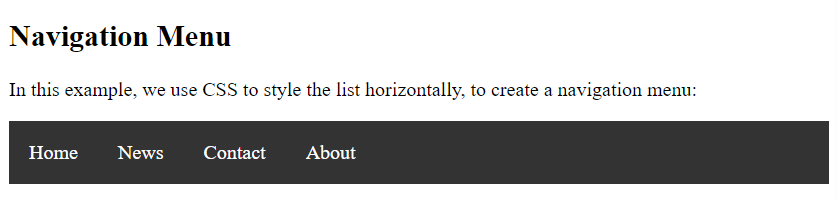
One popular way is to style a list horizontally, to create a navigation menu:
<!DOCTYPE html>
<html>
	<head>
		<style>
			ul {
			  list-style-type: none;
			  margin: 0;
			  padding: 0;
			  overflow: hidden;
			  background-color: #333333;
			}

			li {
			  float: left;
			}

			li a {
			  display: block;
			  color: white;
			  text-align: center;
			  padding: 16px;
			  text-decoration: none;
			}

			li a:hover {
			  background-color: #111111;
			}
		</style>
	</head>
	<body>

		<h2>Navigation Menu</h2>
		<p>In this example, we use CSS to style the list horizontally, to create a navigation menu:</p>

		<ul>
			<li><a href="#home">Home</a></li>
			<li><a href="#news">News</a></li>
			<li><a href="#contact">Contact</a></li>
			<li><a href="#about">About</a></li>
		</ul>

	</body>
</html>
Output: