XML Tree Structure
An XML document has a self-descriptive structure. It forms a tree structure which is referred as an XML tree. The tree structure makes easy to describe an XML document.
A tree structure contains root element (as parent), child element and so on. It is very easy to traverse all succeeding branches and sub-branches and leaf nodes starting from the root.
Example
Example: Bookstore
<?xml version="1.0"  encoding="UTF-8"?>
<bookstore>
	<book category="cooking">
		<title lang="en">Everyday Italian</title>
		<author>Giada De Laurentiis</author>
		<year>2005</year>
		<price>30.00</price>
	</book>
	<book category="children">
		<title lang="en">Harry Potter</title>
		<author>J K. Rowling</author>
		<year>2005</year>
		<price>29.99</price>
	</book>
	<book category="web">
		<title lang="en">Learning XML</title>
		<author>Tom Nolan</author>
		<year>2003</year>
		<price>39.95</price>
	</book>
</bookstore>
Represented graphically in the following image
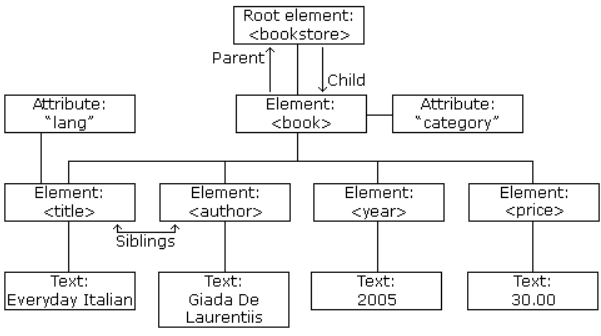
XML Tree Structure
An XML tree starts at a single root element and branches out to its child elements, which can have their own children, and so on. This creates a clear, hierarchical structure.
Core Components of the Tree
Every part of an XML document is a node in the tree.
- Root Element: The single, top-level element that contains all other elements. In our example,
<bookstore>is the root element. - Element Nodes: The main building blocks of the tree, defined by start and end tags (e.g.,
<book>,<title>). - Attribute Nodes: Provide additional information about an element (e.g.,
category="cooking"). They are considered part of the element they belong to, not children of it. - Text Nodes: The actual text content inside an element (e.g.,
"Everyday Italian"). These are often the "leaves" of the tree, as they cannot have children.
For example:
<root type="example">
	<child name="first">
		<subchild>Some text content</subchild>
	</child>
</root>
where:
-
Root Element
<root>is the root element of the XML document.- It contains the
<child>element. - It has one attribute,
type="example".
-
Element Nodes
<root>,<child>, and<subchild>are element nodes.- Each is defined by a start tag and an end tag.
-
Attribute Nodes
<root>has an attribute node:type="example".<child>has an attribute node:name="first".- Attributes belong to elements but are not child nodes of those elements.
-
Text Nodes
<subchild>contains the textSome text content, which is a text node.- Text nodes are the leaf nodes, i.e. they cannot contain other elements.
Understanding Node Relationships
The terms parent, child, and sibling are used to describe the relationships between elements, just like in a family tree.
-
Parent
- Definition: An element that directly contains another element. Each element has exactly one parent.
- Example: The
<bookstore>element is the parent of the two<book>elements. The first<book>element is the parent of its<title>,<author>,<year>, and<price>elements.
-
Children
- Definition: The elements directly contained within another element.
- Example: The two
<book>elements are the children of the<bookstore>element.
-
Siblings
- Definition: Elements that share the same parent.
- Example: The
<title>,<author>,<year>, and<price>elements inside the first<book>are all siblings. The two<book>elements are also siblings.
Self-Describing Syntax
XML uses a much self-describing syntax.
A prolog defines the XML version and the character encoding:
<?xml version="1.0" encoding="UTF-8"?>
The next line starts a <book> element:
<book category="cooking">
The <book> elements have 4 child elements: <title>, <author>, <year>, <price>.
<title lang="en">Everyday Italian</title>
<author>Giada De Laurentiis</author>
<year>2005</year>
<price>30.00</price>
The next line ends the book element:
</book>
Conclusion
Viewing an XML document as a tree is the key to understanding how it is processed.
This hierarchical structure is not just a visual aid: it's the fundamental model that technologies like the DOM (Document Object Model) and XPath use to parse, navigate, and query XML data.
- Every XML document starts with a single root element.
- The structure is defined by the parent, child, and sibling relationships between elements.
- This tree model allows for logical and predictable traversal of the document's data.