CSS Multiple Columns
CSS Multi-column Layout
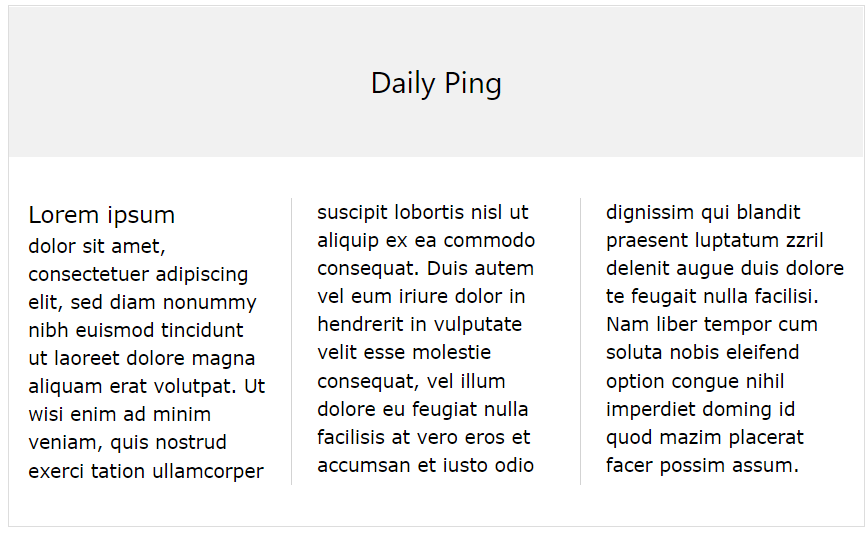
The CSS multi-column layout allows easy definition of multiple columns of text:
CSS Multi-column Properties
In this chapter you will learn about the following multi-column properties:
column-countcolumn-gapcolumn-rule-stylecolumn-rule-widthcolumn-rule-colorcolumn-rulecolumn-spancolumn-width
| Property | Description |
|---|---|
| column-count | Specifies the number of columns an element should be divided into |
| column-fill | Specifies how to fill columns |
| column-gap | Specifies the gap between the columns |
| column-rule | A shorthand property for setting all the column-rule-* properties |
| column-rule-color | Specifies the color of the rule between columns |
| column-rule-style | Specifies the style of the rule between columns |
| column-rule-width | Specifies the width of the rule between columns |
| column-span | Specifies how many columns an element should span across |
| column-width | Specifies a suggested, optimal width for the columns |
| columns | A shorthand property for setting column-width and column-count |
CSS Create Multiple Columns
The column-count property specifies the number of columns an element should be divided into.
The following example will divide the text in the <div> element into 3 columns:
div {
	column-count:  3;
}
CSS Specify the Gap Between Columns
The column-gap property specifies the gap between the columns.
The following example specifies a 40 pixels gap between the columns:
div {
	column-gap:  40px;
}
CSS Column Rules
The column-rule-style property specifies the style of the rule between columns:
div {
	column-rule-style:  solid;
}
The column-rule-width property specifies the width of the rule between columns:
div {
	column-rule-width:  1px;
}
The column-rule-color property specifies the color of the rule between columns:
div {
	column-rule-color:  lightblue;
}
The column-rule property is a shorthand property for setting all the column-rule-* properties above.
The following example sets the width, style, and color of the rule between columns:
div {
	column-rule:  1px solid lightblue;
}
Specify How Many Columns an Element Should Span
The column-span property specifies how many columns an element should span across.
The following example specifies that the <h2> element should span across all columns:
h2 {
	column-span:  all;
}
Specify The Column Width
The column-width property specifies a suggested, optimal width for the columns.
The following example specifies that the suggested, optimal width for the columns should be 100px:
div {
	column-width:  100px;
}